
Support answer · Use & Maintenance
Getting started with your Liberty 600
What to know.
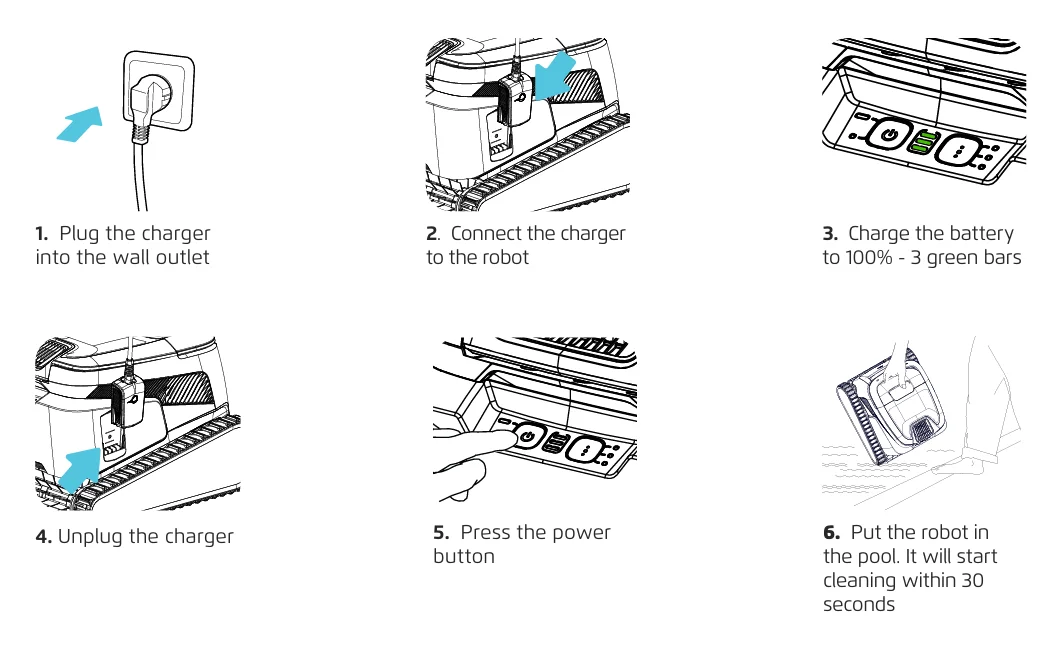
Congratulations on your new Liberty 600 and welcome to the Dolphin family! Getting started is easy. Follow these simple steps:
- Connect the charger to the robot.
- Plug the charger into an electrical outlet.
- Charge it until all 3 bars are solid green. Make sure the robot is fully charged before getting started!
- Once it's finished charging, unplug the charger from the electrical outlet and remove the charger from the robot.
- Press the power button, and let's connect to the MaytronicsOne app.
- Gently place it in the pool. Within 30 seconds, it will start working!
The robot does not stay connected to Wi-Fi + Bluetooth while operating in the water.
Ensure the cycle starts in at least 3 feet of water so the robot can reach and clean areas of the pool effectively.
That’s it! Sit back, relax, and enjoy your sparkling clean pool.
Source: Maytronics support. Rewritten for clarity with the same steps; the videos and illustrations are Maytronics' own.
This answer on your robot.
Maytronics tags this answer for the 1 model below.
Talk to someone who knows Dolphins.
Talk to a Dolphin specialist
Live chat about this question, a part number or a fix. Real people, no bots.
Start a chat
Find an authorized dealer
1,200+ Dolphin service dealers across the US for repairs, parts and warranty work.
Find a dealer
Warranty and repairs
What the Maytronics warranty covers, how to register and how a repair claim works.
Warranty details