
My Dolphin doesn't climb the walls or move sideways on walls
Step by step.
Optimal Pool Conditions for Your Robot
The robot should be used in water temperatures of 6°C - 35°C for optimal results. A low pool temperature can significantly hinder the robot's ability to climb. The water temperature should be maintained at a level higher than 15°C.
Checking Chemical Levels
Next, verify that the pool chemicals are within the recommended range. If the pH levels are too high or too low, this can affect the robot's climbing ability.

Additionally, if your robot has a fast mode or "Floor Only" mode, (only for models compatible with the MyDolphin/MyDolphin™ Plus app or with the power supply unit) verify that these modes have not been set.
Inspecting the Filters
It is imperative to check the filters. If you are using the Ultra-Fine (paper) filter, it should appear white. If the filter is brown or green, clean it with a garden hose set to the highest pressure. If the filter does not return to a white state– it is likely due to be replaced.
For further details, please visit our Replacement Spare Parts page or a local dealer near you
If you are using the Ultra-Fine filters, operate the robot with the Net Filters instead. If the robot is able to climb, this serves as an indication that the Ultra-Fine filters require replacement.
Debris in the Impeller
Make sure there is no debris obstructing the impeller. For instructions on how to clean your impeller, .
- First, unplug the power supply from the outlet. Use a Phillips screwdriver, not a power drill.
- If you notice debris trapped in the impeller, open it, remove the debris, and reassemble the impeller.
Does your robot have an adjustable handle?
Make sure the handle is aligned diagonally to help the robot climb.
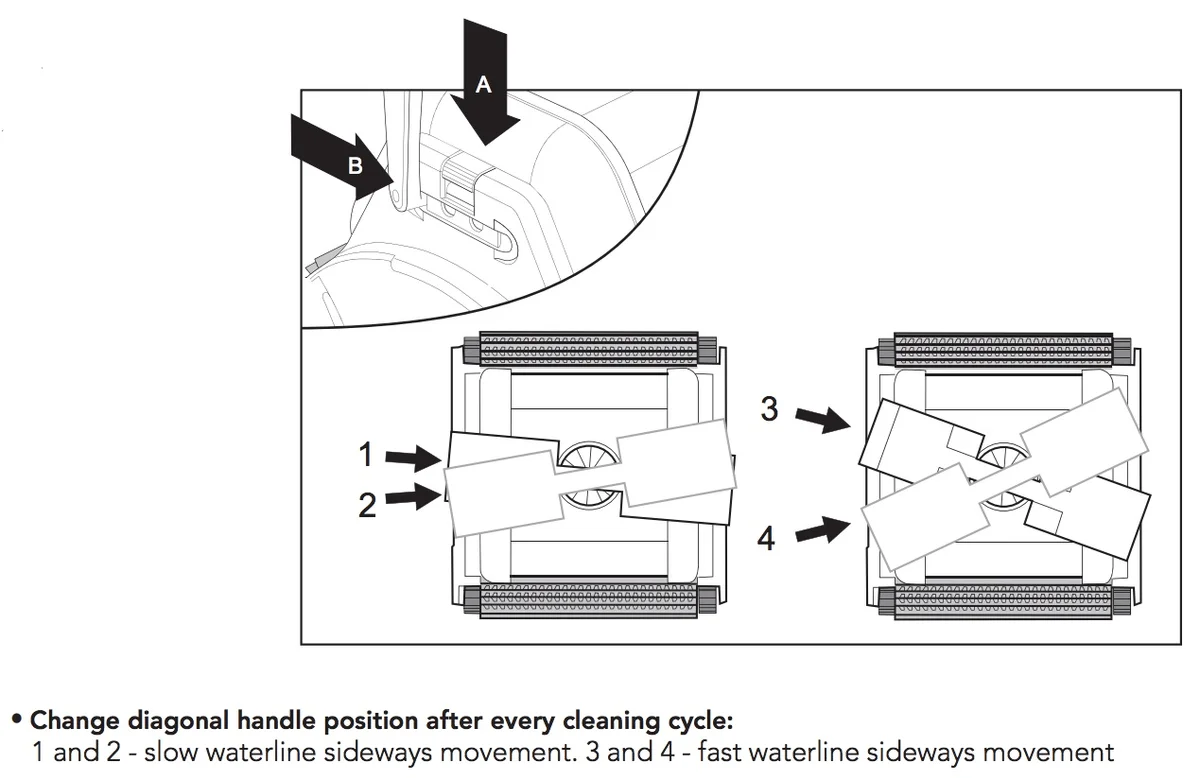
For slow waterline cleaning (covers less surface area, but cleans more intensively): Put one end of the handle in the second/third slot, and the other end of the handle in the second/third slot (pictured above on the left side)
For fast waterline cleaning (covers more surface area, but cleans less intensively): Put one end of the handle in the first slot, and the other end of the handle in the fourth slot (pictured above on the right side)
Sufficient Cable Length
Ensure the robot has sufficient cable to allow it to climb the wall – the cable can pull the robot back if there is not enough of it.
To determine if you have the appropriate amount of cable in the pool, measure the cable length that matches your pool's longest dimension.
It is important to remember not to use an excessive length of cable to avoid tangling issues.
Brush Type
It’s important to use the correct brush based on your Dolphin model, the surface type and slopes of your pool.
PVC brushes are standard and work well for most pool floors.
Combined brushes (PVC with foam climbing rings) help the robot climb and grip better—if your robot has climbing rings, don’t remove them! They’re essential for performance and should be replaced when worn.
Wonder Brush is the ideal choice for ultra-smooth or slippery surfaces like stainless steel or polished mosaic tile.
If your robot struggles to climb walls or stay attached to the pool surface, switching to a combined brush might help.
But hold up—contact our Customer Care Support first to make sure your model is compatible with that switch.
Source: Maytronics support. Rewritten for clarity with the same steps; the videos and illustrations are Maytronics' own.
Parts that fix this.
This answer comes down to brushes & climbing rings. The exact part depends on the model: choose your robot and we open its parts list, or browse the category for every model.
Browse by category:Brushes & Climbing Rings All genuine Dolphin parts →