
What is the Cycle Selector and how do I set the Cycle Selector for my cordless Dolphin Liberty 300 and 400?
What to know.
Liberty 300
On the Liberty 300, the Cycle Selector option allows you to switch the cleaning mode from Regular (for floors, walls, and waterline) to Floor Only.
Liberty 400
The Liberty 400 has an Advanced Cycle Selector.
The three cleaning cycles are:
- Floor Only
- Regular (floor, walls, and waterline)
- Ultra-Clean (cleaning floor, walls, and waterline extra carefully)
You can set the Ultra-Clean cycle through the MyDolphinPlus app only.
See below how to switch from Regular to Floor Only on the Liberty 300 & 400 interface.
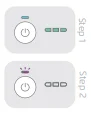
How to Set the Cycle Selector
- Press the power button ON.
- After the battery level LED lights up, press and hold the power button for 3-4 seconds until the battery LED blinks purple 3x.
This will change the cleaning mode from Regular to Floor Only on the Liberty 300 and 400.
The default mode is Regular (floors, walls, and waterline) so once the power button is pressed again or the robot is connected to the charger – the robot will default back to the Regular cleaning mode.
Source: Maytronics support. Rewritten for clarity with the same steps; the videos and illustrations are Maytronics' own.
This answer on your robot.
Maytronics tags this answer for the 1 model below.