
What is the Eco Mode and how do I set the Eco Mode?
What to know.
Eco Mode lets you keep the robot in the pool for up to a week before recharging. Incorporate Eco Mode into your pool routine for added convenience and ease of use, making maintenance simple and hassle-free!
Eco Mode is included with the Dolphin Liberty 200 (manufactured in 2024 onwards), 300 and 400.
Liberty 200 (manufactured in 2024 onwards) & Liberty 300
The Eco Mode is an automatic cleaning scheduling feature that allows you to split the cleaning times into three 30-minute cleaning cycles with sleep intervals of 48 hrs between each cycle for one week.
Liberty 400
The Liberty 400 has an Advanced Eco Mode. The advanced mode has three different options.
Choose between:
- 40-minute cycles every 48 hrs (Floor Only, 3 sessions)
- 60-minute cycles every 72 hours (2 sessions)
- 30-minute cleaning cycles every 48 hours (4 sessions)
Liberty 200/300/400 - How to set the Eco Mode
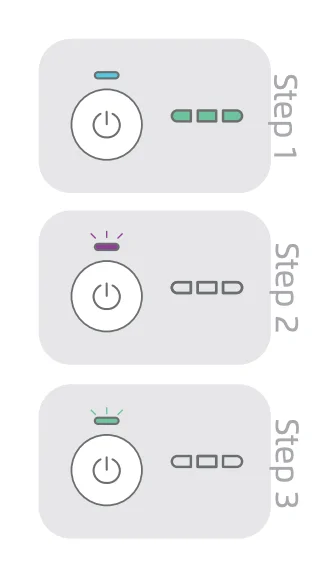
Make sure the battery is fully charged before setting the Eco Mode.
-
To set the Eco Mode, press the Power (ON) button to turn the robot on.
-
When the battery LED turns on, press and hold the Power (ON) button for 5-8 seconds until the battery LED blinks 3x purple, then 3x green.
-
Place the robot in the pool and the robot will start working within 30 seconds.
To deactivate the Eco Mode, press the Power button for 4 seconds, or connect the pool cleaner to the charger.
Source: Maytronics support. Rewritten for clarity with the same steps; the videos and illustrations are Maytronics' own.
This answer on your robot.
Maytronics tags this answer for the 3 models below.