
What settings are available on my Liberty 300/400?
What to know.
Eco Mode (Included with Liberty 200 - manufactured in 2024 onwards, Liberty 300, 400)
The Eco Mode is an automatic cleaning scheduler, which allows you to leave the robot in the pool for up to a week, on one charge. Once the Eco Mode is programmed, the robot will automatically clean the pool floor for up to 40 minutes, 3x a week.
Via the app, LIBERTY 400 can also be set to clean the Floor Only for:
- 30 minutes 4x a week
- 60 minutes 2x a week
- 40 minutes 3x a week (default setting)
How to set the Eco Mode Timer
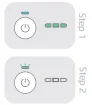
- To activate the Eco mode, press the Power button. After the battery LED lights up, press the Power button again for 5-8 seconds, then the Power button LED will blink 3 times purple, and 3 times green.
- The LED will continue blinking for as long as the Eco mode is active, including the sleep intervals of 48 hours.
To deactivate the Eco Mode, take the robot out of the pool and connect it to the charger. Another way to deactivate the Eco Mode is to press the Power button for 4 seconds.
Cycle Selector (Included with Liberty 300, 400)
You can use the Cycle Selector feature to program the robot to clean in Floor Only mode. The setting will last for one charge.
How to set the Cycle Selector
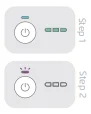
- To activate the Cycle Selector, press the Power button.
- After the battery LED lights up, press the Power button again for 3-5 seconds, then the Power button LED will blink 3 times purple.
Once the power button is pressed again or the robot is connected to the charger – the robot will revert to the default floor, wall and waterline cleaning mode.

End of Cycle Pickup (Included with Liberty 400)
During the last 7 minutes of the cycle, the robot will climb the walls and wait 20 seconds on the waterline for pick up.
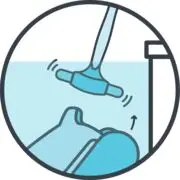
Clicker (Included with Liberty 300, 400)
When you are ready to remove the robot from the pool, shake the Clicker in the water and the robot will climb the nearest wall and wait for pick up.
- After completing the cleaning cycle, shake the Clicker in the water for about 3 seconds, and the robot will climb the nearest wall.
- The robot must finish its cycle before you can activate it with the Clicker.
- In Regular mode, the Clicker can be used up to 2 days after the cleaning cycle ends.
Please note: In Eco Mode, you can use the Clicker between cycles and at the end of the Eco Mode programming. However, using the Clicker will cancel Eco Mode.

Cleaning Modes (Included with Liberty 400)
With the Liberty 400, you can choose the cleaning mode on the app according to your pool's needs.
Regular - Cleans pool floor, walls, and waterline.
Floor - Cleans pool floor.
Ultra Clean - Cleans all pool surfaces (floor, wall, waterline) more thoroughly.
Source: Maytronics support. Rewritten for clarity with the same steps; the videos and illustrations are Maytronics' own.
This answer on your robot.
Maytronics tags this answer for the 1 model below.